The Desktop AI Revolution: Rethinking the Role of Arm CPUs in Local RAG Systems
According to Arm Principal Solutions Architect Odin She’s article on Arm developers’ website:
「 Rethinking the role of CPUs in AI: A practical RAG implementation on DGX Spark 」
「 Rethinking the role of CPUs in AI: A practical RAG implementation on DGX Spark 」
The Bottleneck of Enterprise Search
Offline RAG systems have emerged as the primary solution for enterprises needing to bypass the security risks and inaccuracies associated with cloud-based LLMs.
In corporate environments, critical data such as specifications, project manuals, and operation notes are often fragmented across various servers, making traditional keyword search ineffective due to synonyms and version discrepancies3. Furthermore, uploading sensitive internal data to cloud LLMs often violates security and compliance protocols, driving the demand for fully offline, local RAG systems.
Minimum Viable Architecture for Local RAG
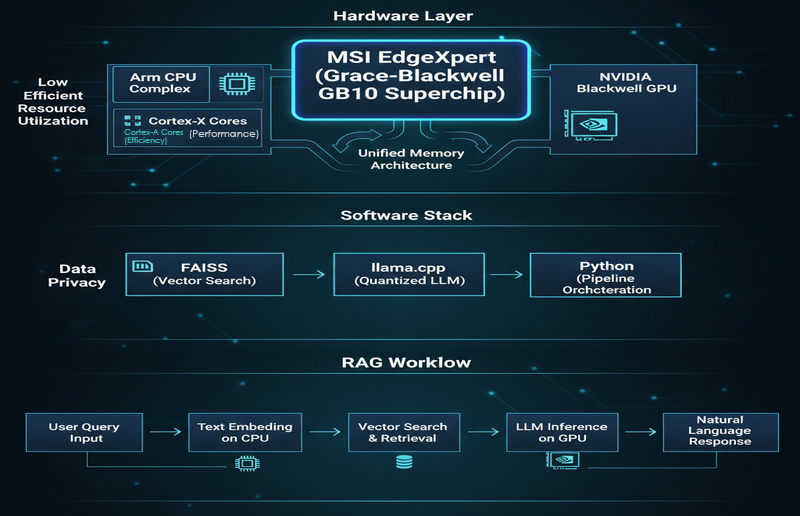
A functional desktop RAG system follows a specific workflow designed to convert raw documents into verifiable AI-generated answers.
To implement this on a desktop or edge platform, the process typically involves the following stages:
- Data Cleaning: Converting PDFs, Word docs, or web pages into a unified format and performing chunking.
- Embedding: Transforming each data chunk into a vector using the CPU.
- Vector Database: Indexing and storing these vectors using tools like FAISS.
- Retrieval: Converting user queries into embeddings to find the Top-K most relevant document fragments.
- Generation: Feeding the evidence and query into a local LLM (e.g., llama.cpp) to generate a cited response.
Metric
Observed Value (Implementation Results)
Embedding Latency
~70–90 ms
(Optimized for interactive, low-latency applications)
(Optimized for interactive, low-latency applications)
DRAM Usage (Idle → Peak RAG)
~3.5 GB → ~14 GB
(Net increase of approx. 10 GB)
(Net increase of approx. 10 GB)
Handoff (CPU Embedding → GPU Gen.)
Minimal Memory Spike
(Indicates successful avoidance of large-scale data replication)
(Indicates successful avoidance of large-scale data replication)
Software Stack
FAISS (Retrieval) + llama.cpp (Inference)
Surprise #1: CPU Superiority in Embedding
Contrary to the belief that GPUs handle all AI tasks, Arm CPUs outperform GPUs in the specific "embedding" phase of RAG by delivering lower latency for interactive queries.
While GPUs excel at massive throughput, RAG embedding tasks are characterized by short sentences, small batches, and a need for instant response.
- Low Latency: Embedding latency on the Arm CPU is approximately 70–90 ms, which is ideal for interactive, real-time queries.
- Efficiency: Using the CPU avoids the overhead of GPU scheduling, startup time, and data transfer via PCIe.
- Stability: It ensures a stable "Query → Retrieval → Response" loop within a timeframe acceptable to users.
Surprise #2: The Power of Unified Memory
Unified Memory architecture eliminates the traditional bottleneck of data copying, allowing the CPU and GPU to access the same data pool seamlessly.
In traditional architectures, data acts like a relay race, requiring time-consuming copying from CPU to GPU via the PCIe bus; Unified Memory acts as a shared track.
- Resource Efficiency: Implementation data shows DRAM usage rising from an idle 3.5 GB to a peak of 14 GB during RAG operations, indicating high resource utilization without redundancy.
- Zero-Copy Transition: The transition from CPU embedding to GPU generation causes almost no spike in memory usage, confirming that massive data replication is avoided.
Surprise #3: Eliminating AI Hallucinations
RAG technology mitigates the risk of "confident but wrong" AI responses by grounding answers in retrieved, verifiable documentation.
AI models often hallucinate when lacking specific domain knowledge, but RAG forces the model to retrieve evidence before generating an answer.
- Comparison Test: In tests involving Raspberry Pi GPIO definitions, non-RAG models gave confident but contradictory answers.
- Verifiable Output: With RAG, the system provided answers consistent with official documentation, citing specific chapters and tables.
Surprise #4: Desktop AI is Deployment-Ready
Desktop-level AI platforms have evolved from experimental prototypes into fully capable development environments for secure, local deployment.
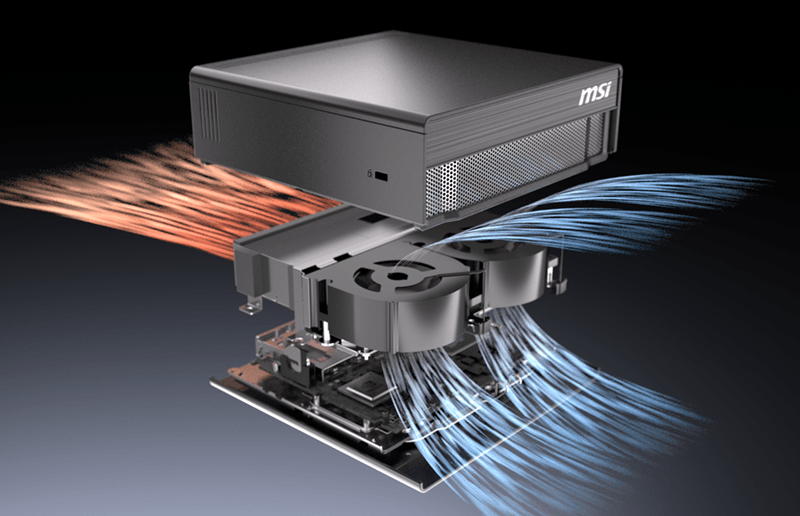
Platforms like the MSI EdgeXpert (DGX Spark) provide the necessary thermal and acoustic design for office environments while supporting complete software stacks like FAISS and llama.cpp.
- Data Sovereignty: All data remains within the intranet, ensuring compliance.
- Scalability: Systems can be expanded to include access controls, audit logs, and multi-language retrieval.
Actionable Advice: Building Your PoC
To rapidly validate a local RAG system, organizations should follow a structured Proof of Concept (PoC) roadmap ranging from data preparation to latency assessment.
- Define Scope: Select 3–5 frequently asked, clear-cut questions (e.g., BIOS parameters, SOPs).
- Prepare Data: Curate 50–200 representative documents that are accurate and parsable.
- Indexing: Perform conservative chunking (300–800 tokens) and build a FAISS index.
- Evaluate: Measure embedding latency (target < 100ms) and retrieval accuracy.
- Enforce Citations: Configure the prompt to require source citations to prevent fabrication.
FAQ: Technical Clarifications
Q1: Why is the CPU faster for embedding?
A: Because user queries are typically "small batch" and "short." The CPU avoids the high overhead of GPU scheduling and PCIe data transfer, resulting in lower end-to-end latency.Q2: What is the benefit of Unified Memory?
A: It minimizes the need to copy large amounts of data between the CPU and GPU, ensuring a smooth handover from the retrieval phase to the generation phase.Q3: Is a GPU mandatory for local RAG?
A: Not necessarily for the retrieval phase, which the CPU handles efficiently. However, a GPU provides significant advantages during the final "generation" phase if using larger models or requiring higher throughput.
MSI EdgeXpert uses Arm CPUs for RAG, cutting latency to 70-90ms. Unified Memory lets GPUs access CPU data instantly, skipping PCIe transfers. This zero-copy design proves the CPU is a vital, active engine for private Edge AI.